
Getting Started with PayTek AutoSuper
PayTek AutoSuper allows businesses to process and manage super payments directly within PayTek.
Before activating PayTek AutoSuper, please complete the following steps to prepare for onboarding.
Step 1: Update PayTek
Ensure PayTek has been updated to the latest version.
Using the latest version ensures your business has access to the PayTek AutoSuper features required for setup.
Step 2: Record Previously Paid Super
Before activating PayTek AutoSuper, you must record any superannuation payments already made during the current financial year.
This ensures previously paid super amounts are not included in future PayTek AutoSuper payment batches.
Record Previously Paid Super
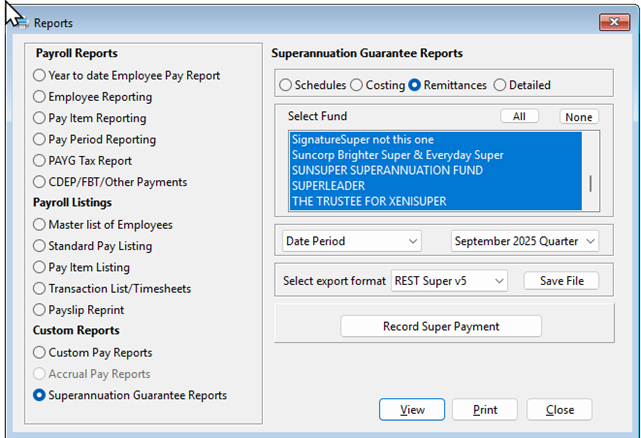
- Go to Superannuation Guarantee Reports and select Remittance
- Select the date range or period for superannuation that has already been paid
- Click Record Super Payment
4. Review the batch, enter the payment date and click Proceed
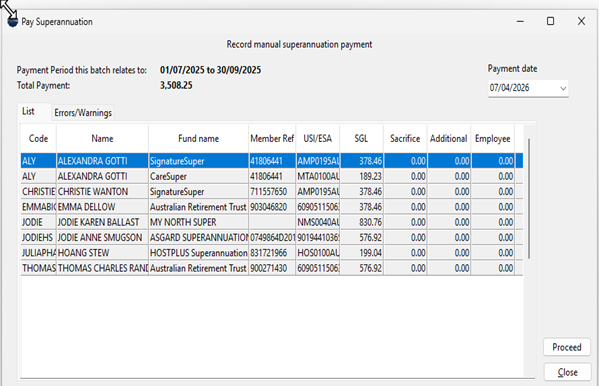
PayTek will record the included pay runs as paid for superannuation purposes.
You can:
- Record all previously paid super in a single batch, or
- Process multiple batches if required
Step 3: Prepare for Onboarding
Before your onboarding session, please ensure:
- You are available on the computer used for payroll processing
- A bank account has been selected for super payments and refunds
- You have authority to use the nominated business bank account
If you are onboarding multiple ABNs, please ensure the above information is available for each ABN.
Step 4: Book your Onboarding Session
We provide onboarding assistance to help users activate PayTek AutoSuper and complete the SuperChoice registration process.
During onboarding, we will:
- Guide you through the SuperChoice registration process
- Configure PayTek AutoSuper
- Assist with setup questions
- Ensure your AutoSuper workflow is ready to use next pay run
Estimated onboarding time may vary depending on the number of ABNs being registered.
Existing PayTek users can access the onboarding booking link provided in their PayTek AutoSuper update email.