
Pay Super with PayTek AutoSuper
After you have finalised your pay run and sent it to Single Touch Payroll, you can create a batch for processing your superannuation payment.
Step 1: Create the batch
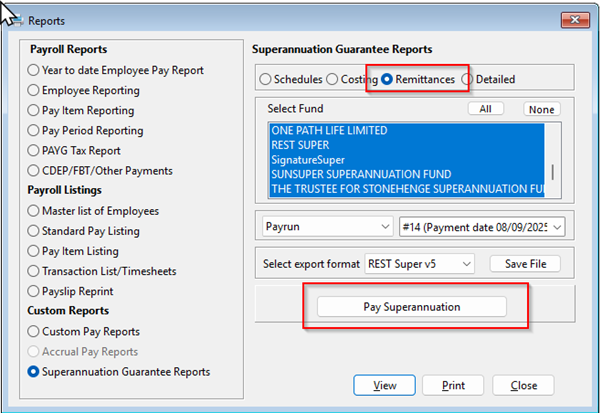
From the Reports menu select Superannuation Guarantee Reports and select the Remittance tab.
Select all funds and the pay run you are paying. (If you are paying multiple pay runs you should select them with the date range option).
Click Pay Superannuation and PayTek will create the payment batch.
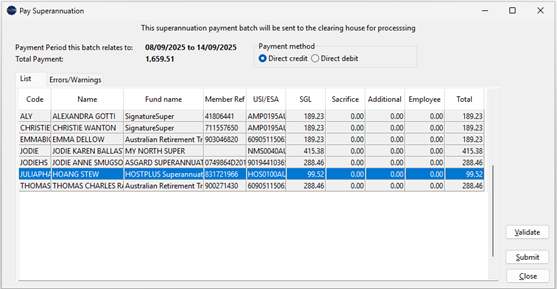
The payment batch shows the total to be paid for each employee and their superannuation fund.
You should select the payment method for the batch.
Step 2: Validate the batch
Click Validate to send the batch to the clearinghouse.
Any errors detected will be displayed so you can correct them and try again.
Step 3: Submit the batch
Once clear of any errors you can submit the batch.
If successful, the batch details will be recorded against each employee (in the enquiry screen) and an entry created in the superannuation payment list.
Step 4: Make super payment
DIRECT DEBIT: If you select Direct Debit, the clearinghouse will deduct the funds automatically from your nominated bank account.
DIRECT CREDIT: If you select Direct Credit, you can see the payment details from the Superannuation Payments List.
Select the payment batch and click Status. Allow a few minutes for submissions to be accepted before status is updated with payment reference.
Check the status of the payment batch
You can check the status of a payment batch.
Select Reporting → Superannuation Payments
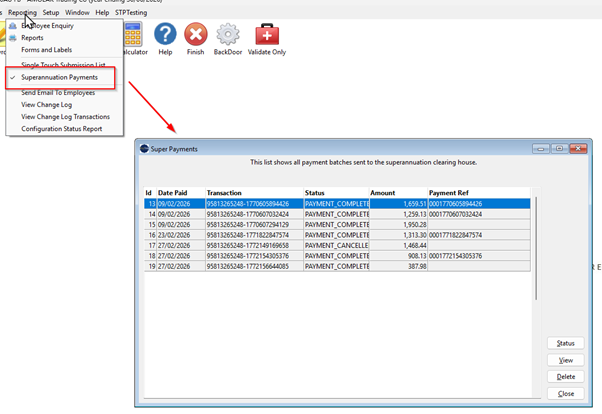
Each time you open the status window, PayTek will retrieve the details from the clearinghouse.
The status window has 3 panels.
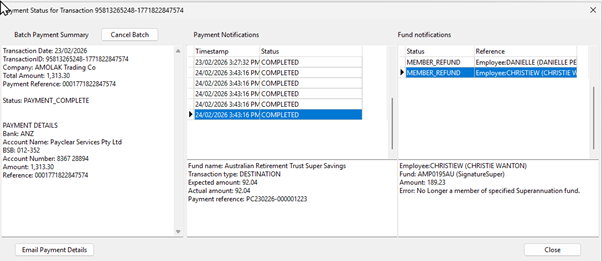
1. Batch Payment Summary
This shows the status, totals and payment details of the batch.
Note the payment status only refers to the payment from the clearinghouse to the funds. If a fund returns a payment, they may not advise the clearinghouse for several days
2. Payment Notifications
This panel shows the payments involved with the batch.
The first payment is from you the employer to the clearinghouse. This is the total batch amount. Having received the payment, the clearinghouse then pays each fund for their members contributions.
3. Fund Notifications
If the fund returns a payment or sends a warning about a member they will send a notification. This may take some time. Any refunds will require a correction in PayTek. The payment batch must be amended to remove the refunded payment so it can be paid correctly in a future batch.